
Web content must have headings to be as readable, accessible and beneficial to search engine optimisation (SEO) as possible. Website headings help users, search engines and artificial intelligence (AI) understand your content and quickly locate the information they need, supporting perceptions of experience, expertise, authoritativeness and trustworthiness (EEAT). In this article, we will cover how optimising your headings for SEO can improve your search visibility and help your business target relevant traffic.
What Are Headings?
Headings are the titles and sub-titles that structure your content. They serve as signposts, dividing and contextualising sections on your page. In HTML, heading tags are pieces of code that inform browsers, search engines and assistive technologies, such as screen readers, how your content is organised and should be presented to users.
There are six levels to the heading hierarchy, ranging from H1 to H6. Where an H1 denotes the overall page topic, H2 headings in SEO divide the content into main sections. Then, H3s, H4s, H5s and H6s divide these sections even further. The hierarchy creates a logical outline that helps users, search engines and AI to read and understand your written content.
In HTML, heading tags look like this:
- <h1>Heading 1</h1>
- <h2>Heading 2</h2>
- <h3>Heading 3</h3>
- <h4>Heading 4</h4>
- <h5>Heading 5</h5>
- <h6>Heading 6</h6>
Importance of Headings for SEO
Website headings are essential for creating helpful, reliable, people-first content, which search engines such as Google prioritise when generating search engine results pages (SERPs). But they benefit content in even more ways than this, in that they also:
Provide a good user experience
User-friendly content positively impacts SEO. While heading tags do not directly affect your SERP rankings, user experience does. Search engine bots prioritise and reward usability, and are more likely to present users with content that is easy to read and digest.
Promote accessibility
Using appropriate headings can also improve your site’s accessibility for users who need assistive technology, such as screen readers, to browse online. Clearly structured headings enable these users to scan through your content aurally rather than visually, saving time.
Structure and break up text
Finally, headings are important for helping users scan content for the information they want. Relevant, descriptive headings signal subtopics and incentivise users to stay on your page. This increases dwell time, a common user engagement metric, and contributes to SEO.

Best Practices for Headings and SEO
There are several best practices regarding heading structure in SEO. To optimise and divide your content in the clearest possible way, consider these six actions when using website headings for SEO:
1. Use a proper hierarchy
Not all website headings are created equal. H1s are most important and sit at the highest level, while H6s are least important and sit at the lowest level. To clearly communicate the reading order of your page, keep the hierarchy in mind when applying headings in content.
2. Make headings visible
Format H1 and H2 headings for SEO to be big and bold, as noticeable website headings improve navigation. Smaller headings should also be visible, but their size should reflect that they delineate sub-sections rather than major topics. H3s, H4s, H5s and H6s are best kept more subtle to prevent visual clutter while maintaining a clear reading order.
3. Make headings engaging
Interesting website headings capture users’ attention and encourage them to stay on your page. The resulting lower bounce rate signals to search engines that your page contains high-quality, relevant information and can boost your ranking in SERPs.
4. Consider user experience
Breaking up text, especially on longer pages such as blogs, keeps users engaged and helps them navigate to the information they want. Rather than an intimidating wall of text, content divided by headings is easier to read and quickly scan through.
5. Incorporate keywords naturally
Keywords signal your page’s topic to search engines so they can easily link your site to relevant queries and drive high-quality traffic in your direction. Using keywords in prominent positions on your page, such as in headings, sends an even stronger signal and makes your content more likely to appear in SERPs and outperform competitors for certain queries.
6. Use one H1
In SEO headings, H1 tops the hierarchy and communicates your page’s overall topic. Using just one per page ensures that your content remains focused and relevant to the topic you want to rank for. Using more than one could confuse users, search engines or AI, and negatively impact your search visibility as a result.
How to Use Headings (Example)
As strong supporting content, an optimised blog can do wonders for your organic visibility. Part of optimising a blog [https://www.zelst.co.uk/expertise/content/content-optimisation-services/], as with any webpage, is using headings correctly.
To illustrate blog post headings for SEO, here is an example outline. In fact, it is the heading structure for the very blog you are reading now:
- H1: How to Use Headings for SEO
- H2: What Are Headings?
- H2: Importance of Headings for SEO
- H2: Best Practices for Headings and SEO
- H3: Use a proper hierarchy
- H3: Make headings visible
- H3: Make headings engaging
- H3: Consider user experience
- H3: Incorporate keywords naturally
- H3: Use one H1
- H2: How to Use Headings (Example)
- H2: How to Format a Heading
- H3: Achieve SEO-Friendly Content with Zelst
By structuring our content this way, we have followed heading structure and SEO best practices, ensuring our blog is easy to navigate and understand.
How to Format a Heading
Now that you know how to structure website headings correctly, you must know how to implement them. Here is our guide to using headings in one of the most popular content management systems, WordPress.
There are two ways to add headings in WordPress: by using the visual tab or the text tab.
Visual tab
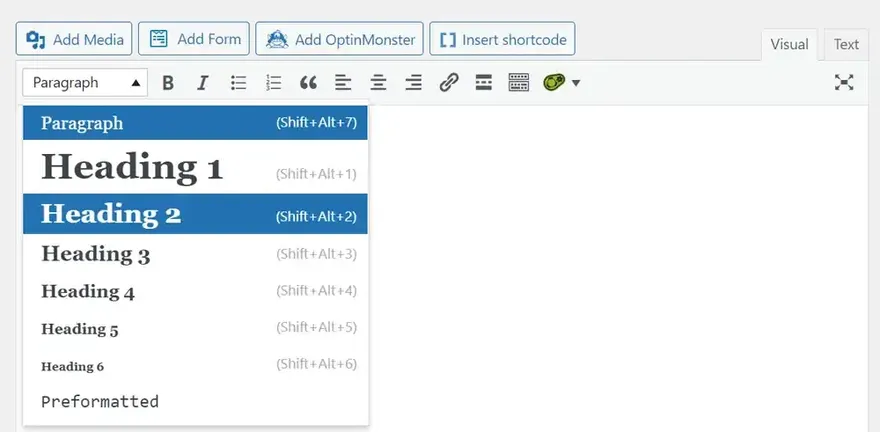
In the visual tab of the content editor, the default block-based system used to design pages and blogs, you can simply select a heading type from the dropdown menu.
Text tab
If adding headings using HTML, you must specify their types in the code. In the text tab of the content editor, sandwich each heading between corresponding opening and closing tags. If your heading is an H1, these tags will read “<h1> [heading text] </h1>”. If your heading is an H2, they will read “<h2> [heading text] </h2>”, and so on.
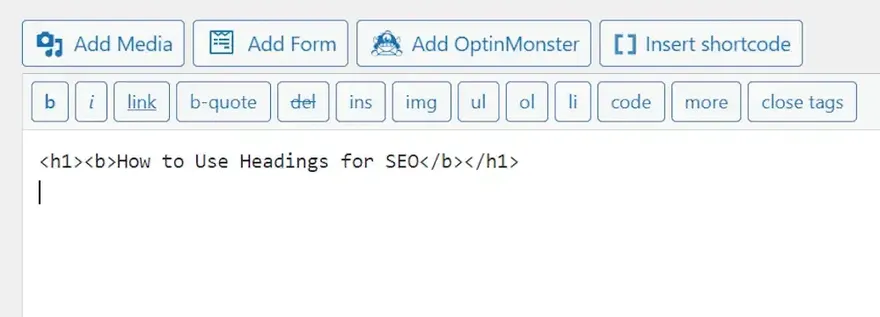
You can easily swap between the visual and HTML editors in the block toolbar in WordPress. Click on the three dots and select ‘Edit as HTML’. To add headings to WordPress quickly and easily, use the following keyword shortcuts:
- H1 = Shift + Alt + 1
- H2 = Shift + Alt + 2
- H3 = Shift + Alt + 3
- H4 = Shift + Alt + 4
- H5 = Shift + Alt + 5
- H6 = Shift + Alt + 6
Achieve SEO-Friendly Content with Zelst
We hope this article has improved your understanding of how to use headings for SEO and why they are important for organic search visibility. To learn more about heading structure in SEO or how Zelst’s expert team can support you with SEO-friendly content, please get in touch today.